Player profiles
Add and rename players, choose one primary player, and archive or reactivate profiles without deleting their match history.
FinCricket · Android · Public beta
FinCricket is an offline scorekeeper for a custom two-player Cricket game. It handles hits, scores, turns, and history so you can focus on throwing.
 Custom Cricket · 2 players
At a glance
Add and rename players, choose one primary player, and archive or reactivate profiles without deleting their match history.
Pick from active profiles or type a new name when starting a match. The two player positions always use different profiles.
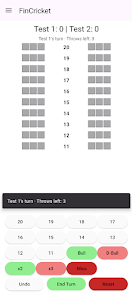
The current players, scores, hit marks, closed sectors, turn, throws, and available undo actions are restored after the app closes or the screen changes.
Completed games retain the names used in that match. Filter newer history by an active participant or view every saved game.
Use the app in portrait or landscape on phones and expanded screens. Scoring controls remain reachable on short displays.
Switch between English and Finnish. The interface follows supported light and dark appearance settings.
Inside the app


FinCricket does not require an account and does not include ads or analytics. Player profiles, the active game, settings, and completed-game history stay on the device.
Scoring works without a network connection. Internet access is used only when Google Play checks or downloads an update, or when you choose to open an external privacy, support, or store link.